Frequently Asked Questions
Common questions about the Redmine 1-Click installer, server requirements, security, billing, and support.
×
Do I need to be a Linux expert?
You need SSH access to your server and just be able to run one single command. The installer handles all the complex dependency management, installs Ruby from packages when possible (with fallback compilation), and configures everything automatically and in just a few minutes.
What server specs do I need?
Any VPS or dedicated server running Ubuntu 24.04/22.04 LTS or Debian 12/13, with at least 1 CPU core, 2 GB RAM, and 10 GB of disk space. Works on AWS, DigitalOcean, Hetzner, Vultr, many others and on your own inhouse Linux server. See the System Requirements for the full list.
Can I inspect the script before running it?
Absolutely. The script is a plain bash file you can open in any text editor. We encourage you to review it — it's fully transparent about every step it takes on your server.
What if the installation doesn't work?
If the installation fails, check our Documentation — most issues are caused by server connectivity or preinstalled software. If you still need help, visit our Support page. Not satisfied for any reason? We offer a full refund within 30 days. See our Refund Policy.
What version of Redmine will the script install?
Redmine 6.1.1 — the latest stable release. Ruby 3.4.6 is installed with a package-first approach and falls back to rbenv compilation only when needed.
You can also install older Redmine (5.1.1) and Ruby versions that are included in the wizard.
You can also install older Redmine (5.1.1) and Ruby versions that are included in the wizard.
Do you store my Redmine or database passwords?
Passwords are not kept in our database or transaction records. They exist on our server only temporarily during checkout and inside the script file during the 48-hour download window, then are permanently deleted. After installation they are stored on your own server at
/root/redmine-credentials.txt with root-only access.What happens to the data I enter in the wizard?
Passwords are not kept in our database or transaction records — they exist on our server only temporarily during checkout and inside the script file during the 48-hour download window. Your configuration data (domain, database name, admin username, etc.) is also kept temporarily for up to 48 hours so you can download your script, then permanently deleted. We retain only your email address, stack selection, and transaction details as standard business records. See our Privacy Policy for full details.
How long does the installation take?
With a recommended OS (Ubuntu 24.04 or Debian 13), a mid-range server, the latest Redmine version, and the recommended Ruby version without SSL, the installation typically completes in 2 to 3 minutes. With older Redmine and Ruby versions, a full Ruby compilation is required, which can take around 10 minutes.
Which file should I send to support?
Share
/var/log/redmine1click-support.log. It is sanitized for troubleshooting. Avoid sharing raw credentials unless you have rotated them first.Can I run the installer on a server that already has software installed?
The installer is designed for freshly provisioned servers.
Running it on a server with an existing MySQL instance will cause MySQL
to be replaced by MariaDB — with data loss.
An existing PostgreSQL/MySQL user or database with the same name as the one you configure will cause the installer to abort. For the full details, see the System Requirements.
Can I install Redmine on a subdirectory (e.g. example.com/redmine) or on a non-standard port (e.g. example.com:8080)?
Not at this time. The installer deploys Redmine at the root of the domain or IP address, listening on the standard ports (80 for HTTP, 443 for HTTPS). Subdirectory and custom port support are planned for a future release.
Can I use Redmine 1-Click on a Windows Server?
Not directly. The installer generates a Bash script designed for Linux (Debian or Ubuntu). It will not run on Windows natively. However, if your infrastructure requires Windows Server, you can run the installer inside a dedicated Ubuntu virtual machine hosted on the same Windows Server. Hyper-V, which is built into Windows Server, works well for this. We have a dedicated guide covering VM sizing, networking, and SSL configuration for this setup. Keep in mind that this deployment model depends on correct VM networking and port forwarding, which varies by environment — we can help troubleshoot the installer itself, but not the Windows or Hyper-V configuration.
Is this a subscription?
No. It's a one-time payment. You pay once, download your personalised script, and it's yours to keep and re-run whenever you need it.
Can I get a tax invoice for my purchase?
Yes. Paddle, our payment provider, automatically sends a tax-compliant
invoice to your email after purchase. If you entered a VAT number
during checkout, it will appear on the invoice.
You can also download the invoice anytime from the receipt link in your confirmation email.
You can also update your tax details after purchase through Paddle's customer portal link included in our notification email.
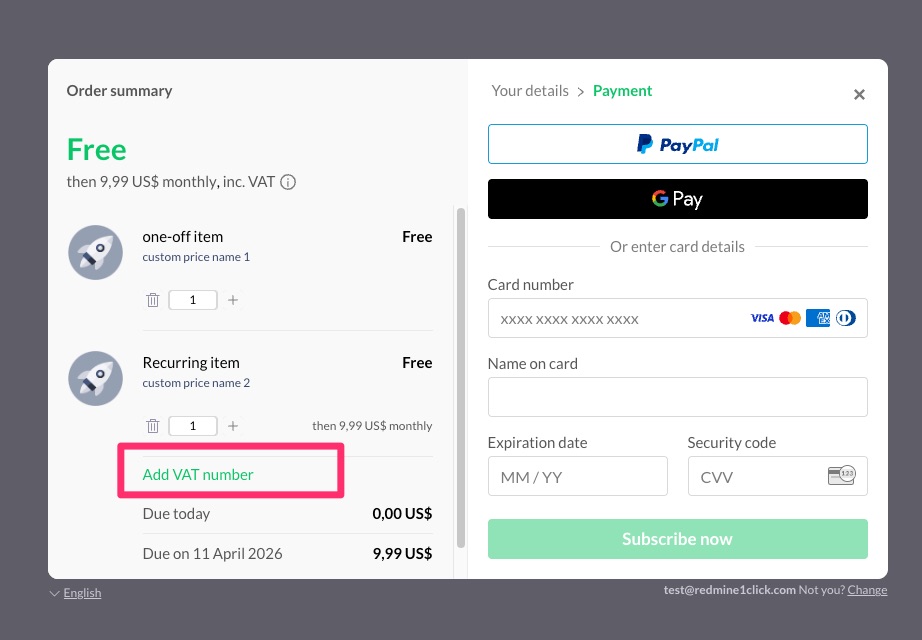
Where do I enter my VAT number during checkout?
On the payment screen (the second step, after entering your email, country, and postcode), click the "Add VAT number" link shown on the left side of the order summary. Your VAT will be validated and applied automatically to your invoice.
 Click to enlarge
Click to enlarge
I forgot to add my VAT number during checkout. Can I update my invoice?
Yes. Open the Paddle customer portal link included in your download email. From there you can update your invoice with your company name, VAT number, and billing address. Paddle will automatically recalculate tax and send you a revised invoice. Note that each invoice can only be updated once, so make sure all details are correct before submitting.
No matching questions found.